
If your charity uses Raisely, you have probably come to rely on personalised URLs, or PURLs. They are the links in your emails that help reduce the friction your supporters experience when they click a link to donate, by pre-populating your checkout pages with some of their basic contact details (think name, email, address and so on…). A supporter clicks through and the donation form greets them by name and remembers the campaign they care about, which saves them from typing out details you already hold. It is a small thing, but it makes a real difference to how many people go on to give.
Earlier this year Raisely made an announcement about a change to how these personalised links work, and it caught a lot of fundraising teams by surprise. This article explains what changed, why it happened, and how we can keep your personalised links working without you having to think about it.
What Raisely changed, and why
The change itself was sensible. Raisely decided to stop personal information, such as names and email addresses, from appearing directly in the web address of a link. When personal details sit in a URL they can end up saved in browser histories, server logs and analytics tools, which is not where anyone wants supporter data to be. To protect donors, Raisely moved to a more secure approach that uses a short-lived access token instead. The token ensures that the personalised experience still works, but the supporter details are no longer on show in the link.
For supporters, this is good news, and for your charity it is the responsible way to handle data. The catch is in the practical detail. These tokens do not last forever, and they need to be kept current. If you send your emails through Raisely’s own messaging, Raisely looks after this for you. If you send through a separate email platform such as Campaign Monitor, MailChimp, Ortto or something else, which many charities do because of better access to automation and design tools, the tokens are not refreshed automatically. Over time, they expire, and the personalised links in your emails stop working.
What about my custom ask amounts?
It’s now common for digital fundraisers to personalise the ask amounts for each donor based on their past giving history. For example, you wouldn’t want to ask a donor that has consistently given $500+ to your recent appeals for $10. By passing in custom ask amounts, you can make sure the value of the gift you ask for fits the donor’s capacity and willingness to give to your cause.
If you’re passing custom ask amounts in the URL, then you can continue to do this as per these instructions. This is because ask amounts are not personally identifiable information (PII) so can still be passed as a URL query string. Your final url would end up looking something like:
www.your-campaign-url.org?access_token=[user_access_token_here]&button1=100&button2=150&button3=275A URL can only have one question mark (?) because it marks the start of the query string (the section that passes information to the webpage).
Think of it like this:
- Everything before the
?is the web address. - Everything after the
?is extra information (called URL parameters). - If you need to send multiple pieces of information, you separate them with an ampersand (
&), not another?.
Why this matters to your fundraising
When a token expires, one of two things might happen:
- Nothing and no personalisation – the supporter does not see a message explaining what has happened. They simply land on a page that no longer recognises them. The tailored experience you set up is gone, the form no longer fills itself in, and the supporter is more likely to give up before they finish giving. For automated email journeys, where messages go out day after day without anyone checking each one, this can carry on unnoticed for weeks.
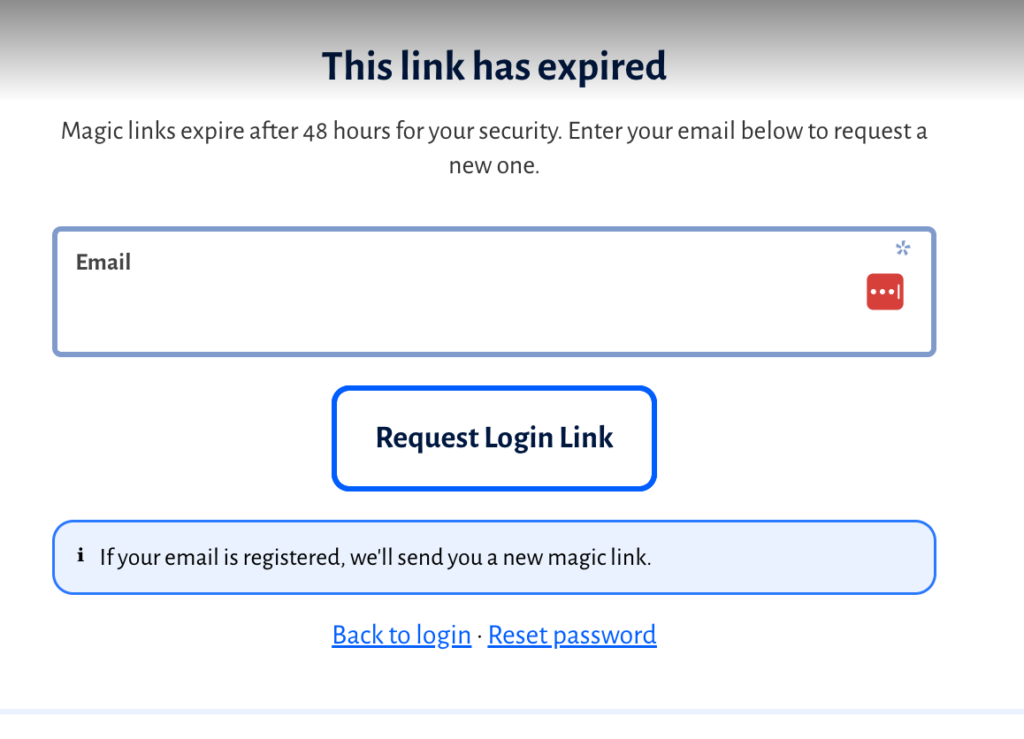
- Raisely might prompt them that their token has expired – to the average supporter, this will likely result in much befuddlement as they’re not really thinking about your PURL access token links when clicking your beautiful email links. When this happens they will be given the option to “request a new token” – many supporters might scratch their chin and think “well I never had an old token so I’m not sure what you mean”….
Sorting it out by hand is possible, but it is fiddly and it never really ends. Because the tokens keep expiring, someone on your team would need to keep refreshing and re-importing them on a regular basis. That is time your fundraisers should be spending on supporters, not on data housekeeping.
How Digital Ninjas keeps your PURLs working
We have built a tool that does the hard yakka of syncing and refreshing for you, automatically and in the background. It keeps the access tokens in your email platform up to date on a regular schedule, so the personalised links in your campaigns and automated journeys carry on working as your supporters expect. No more wrangling data out of Raisely and into your email tool (especially important if you’re using email auotmations).
Because it runs on its own, there is nothing for your team to remember and nothing to re-import by hand. If something does go wrong we can see it, because every refresh is recorded and any problems are flagged for us to look into. It works with Campaign Monitor, Mail Chimp and Ortto today and we’re looking to extend this capability to support more platforms as charities need.
We built this because Raisely’s security change is a good one, and charities should not have to choose between protecting supporter data and running the personalised campaigns that help them raise more. With the refreshing handled for you, you can have both.
Need a Raisely PURL Token Ninja?
Get in touch and we’ll help you put the token in your PURLs…